Step 1 - Automating the VPC Creation Process
Access the Terraform VM and change the scripts for the Cluster Login
Login to the Prism Central
Click on Infrastructure in the App Switcher
Scroll down on the side bar to go Compute and Storage
Click on "VM"
Select the Terraform VM. Verify the IP address of the Terraform VM
SSH to the Terraform VM with the following credentials
- username: root
- password: nutanix/4u
Verify that the scripts exist in the following directory "VPC and PBR Terraform Scripts"
- cd VPC and PBR Terraform Scripts
- vi terraform.tfvars
- This file contains the credentials to used for logging into the prism central, and also the VPC external subnet to be used prism_user = "admin" prism_password = "Password to the Prism Central" prism_server = "Prism Server IP address" prism_port = "9440" external_subnet_name ="External Subnet Name"
- Save the file using the "wq!" command on the vi
Executing the Terraform Scripts
- terraform init
- terraform plan
- terraform apply
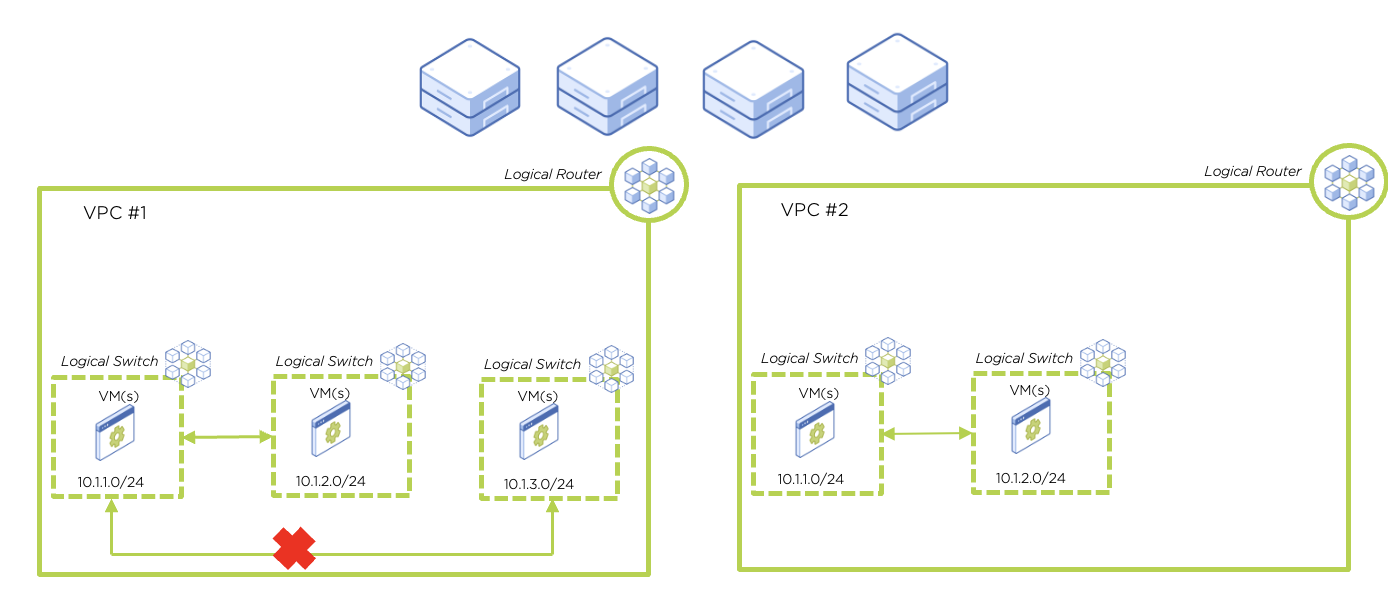
Verify that the VPCs are created in the environment. For this particular script, it will create 1 VPC with 3 subnets in the environment. Each Subnet will have 1 VM. And between Subnet 1 & 2. They will have an additional policy rule that denies traffic between them. An overview of what is created in this automation script is as per the
To destroy the VPCs that are created using the script, exceute the command
- terraform destroy
An overview of the Script and what was deployed is as per the diagram below